POS module inside Fusion4o Biz Suite

Run the counter without disconnecting it from the business.

Fusion4o POS is the register module inside Fusion4o Biz Suite. Cashiers handle billing, receipts, shifts, customer credit, restaurant tickets, and garments variants while stock, accounts, reports, and backup stay connected.

Windows desktop app Works offline Connected to Biz Suite
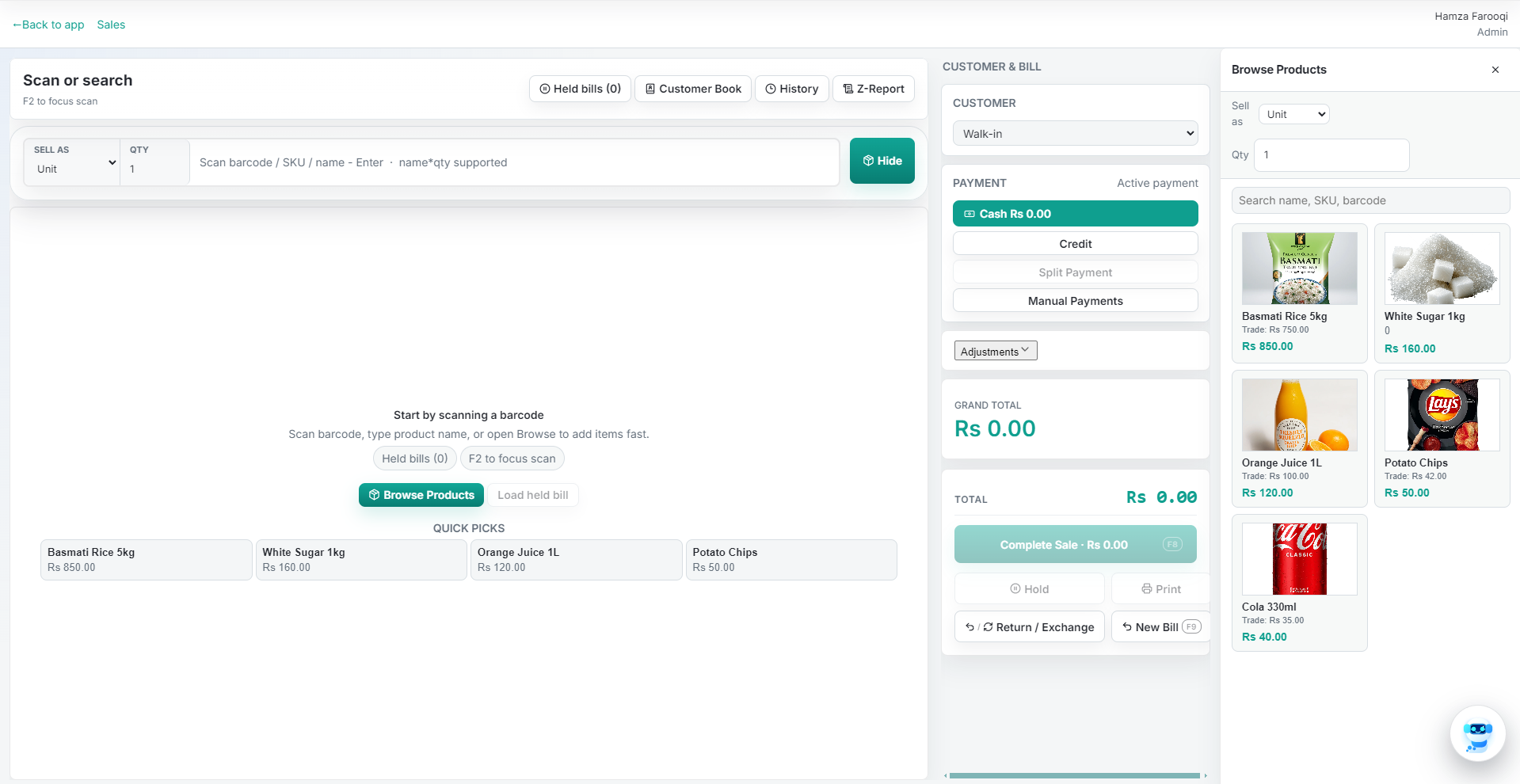
Fusion4o POS register screen with barcode search, held bills, customer book, payment methods, quick picks, and receipt actions
Actual Fusion4o POS register Barcode scan, quick picks, customer credit, payment methods, receipt, hold, print, and return actions.
Counter workflow

What the register handles every day.

POS stays focused on speed at the counter while Biz Suite keeps stock, customers, vendors, accounts, expenses, reports, and backup aligned.

01

Bill at the counter

Scan barcode, search product, hold bills, split tender, take cash/card/credit, and print thermal or A4 receipts.

02

Update stock automatically

Every sale, return, purchase, batch, and expiry update stays tied to inventory without a separate spreadsheet.

03

Control credit and cash

Track customer balances, received payments, cashier shifts, expenses, and closing totals in one place.

04

Read the day clearly

See sales, cashier performance, stock value, low-stock products, purchases, and profit signals before closing.

Checkout

A fast billing flow for busy retail counters.

Fusion4o POS keeps the sale moving during rush hours. Cashiers get a focused screen for products, quantity, discounts, payment, customer credit, receipt printing, and WhatsApp invoices.

01
Barcode and search

Scan products or search by name, SKU, supplier code, and category.

02
Local payments

Cash, card, bank transfer, online wallet, split payments, credit, and installments.

03
Receipts that fit

Thermal and A4 receipts with configurable shop name, footer, and invoice details.

Connected suite data

Counter activity feeds the wider business system.

Every sale can inform inventory, customer credit, vendor purchasing, expenses, accounting, reporting, and backup workflows.

Stock

Inventory updates with every bill

Barcode stock, purchase entries, return handling, batch/expiry support, reorder alerts, and Excel import for faster setup.

Credit

Customer balances stay visible

Credit sales, received payments, customer history, and balances help owners control cash without manual ledgers.

Cash

Cashier shifts close cleanly

Role-based access, cashier sales, expenses, payment breakdowns, and closing totals protect daily cash movement.

Reports

Owner numbers without cleanup

Daily sales, purchase reports, stock valuation, profit and loss, party ledger, and exports as the business grows.

Built for Pakistan

Designed around local retail realities.

The system is practical for low-spec Windows PCs, cash-heavy counters, weak internet, and owners who need clear daily control.

Offline-first counter Sales, inventory, shifts, and receipts continue locally during internet issues or load-shedding.
Encrypted backup AES-GCM encrypted backup syncs to Google Drive when the connection returns.
Flexible business modes Retail leads the workflow, with garments size-colour stock and restaurant table/KOT support available.
Also supports

Restaurant and garments workflows when the business needs them.

Retail is the main path, but the same operating backbone supports more specialized counters.

01

Retail

Barcode billing and product search Customer credit and purchase history Purchases, expenses, and stock valuation Thermal and A4 invoices
02

Garments

Size and colour variant matrix Style codes and supplier codes Seasonal stock and replenishment Style-wise stock views
03

Restaurant

Tables, sections, and floor plan Dine-in, takeaway, and delivery KOT printing and kitchen routing Shift-wise cashier reports
Access and backup

Keep cashiers focused and business data recoverable.

Role-based permissions protect settings and reports, while backup keeps local business data safer.

Admin

Administrator

Full system access for users, settings, reports, backup, and all modules.

Mgr

Manager

Operational access for shifts, stock, reports, and limited settings.

POS

Cashier

Focused billing access for checkout lanes without exposing admin controls.

AI

Premium Plus

Fusion Assistant, screen-aware help, persistent chat, and encrypted cloud backup.

Biz Suite tiers

Pick the plan by how much business control you need.

Exact PKR pricing depends on business size and setup needs. Plans expand from core POS into purchases, accounts, expenses, reports, backup, WhatsApp handoff, and Fusion Assistant.

Free Start selling

Core POS, stock basics, customers/vendors, thermal receipt, and local backup.

Basic Manage daily operations

Sales history, returns, credit sales, purchases, standard reports, and backup export/restore.

Premium Grow reporting depth

WhatsApp invoices, balance sheet, advanced exports, all Pro features, and priority support.

Premium Plus Add AI and assurance

Fusion AI Assistant, persistent chat, screen-aware prompts, AES-GCM backup, and all Premium features.

Contact us for exact PKR pricing - tailored to your business size, counters, and vertical.

See the POS module inside the full Biz Suite flow.

Book a free demo and review billing, inventory, credit, reports, accounts, backup, and support with your actual business workflow in mind.